
Notice
Recent Posts
Recent Comments
Link
| 일 | 월 | 화 | 수 | 목 | 금 | 토 |
|---|---|---|---|---|---|---|
| 1 | 2 | 3 | 4 | 5 | 6 | 7 |
| 8 | 9 | 10 | 11 | 12 | 13 | 14 |
| 15 | 16 | 17 | 18 | 19 | 20 | 21 |
| 22 | 23 | 24 | 25 | 26 | 27 | 28 |
Tags
- IntelliJ
- DesignPattern
- 객체지향프로그래밍
- 성수볼거리
- Linux
- 상속
- 오브젝트
- 객체지향
- JAVA개발자
- 헤드퍼스트디자인패턴
- Java
- 책너두
- 직장인
- docker
- 헤드퍼스트
- 독서
- 디자인패턴
- 성수맛집
- 성수직장인
- 개발자
- 주니어개발자
- 코딩
- 클린코드
- 독서일지
- 성수
- 책읽기
- JavaScript
- 직장인점심
- 깨끗한코드
- 성수핫플
Archives
- Today
- Total
런타임노트
[오류] intelliJ 실행 시 finished with non-zero exit value 1 본문
728x90
intellij, Gradle 환경에서 프로젝트를 첫 실행 할 때 아래와 같은 오류가 발생하는 경우가 있습니다.
Execution failed for task ':DemoSpringApplication.main()'.
> Process 'command 'JDK경로/bin/java.exe'' finished with non-zero exit value 1
* Try:
Run with --stacktrace option to get the stack trace. Run with --info or --debug option to get more log output. Run with --scan to get full insights.
이럴 경우 해결 방법은 아래와 같습니다.
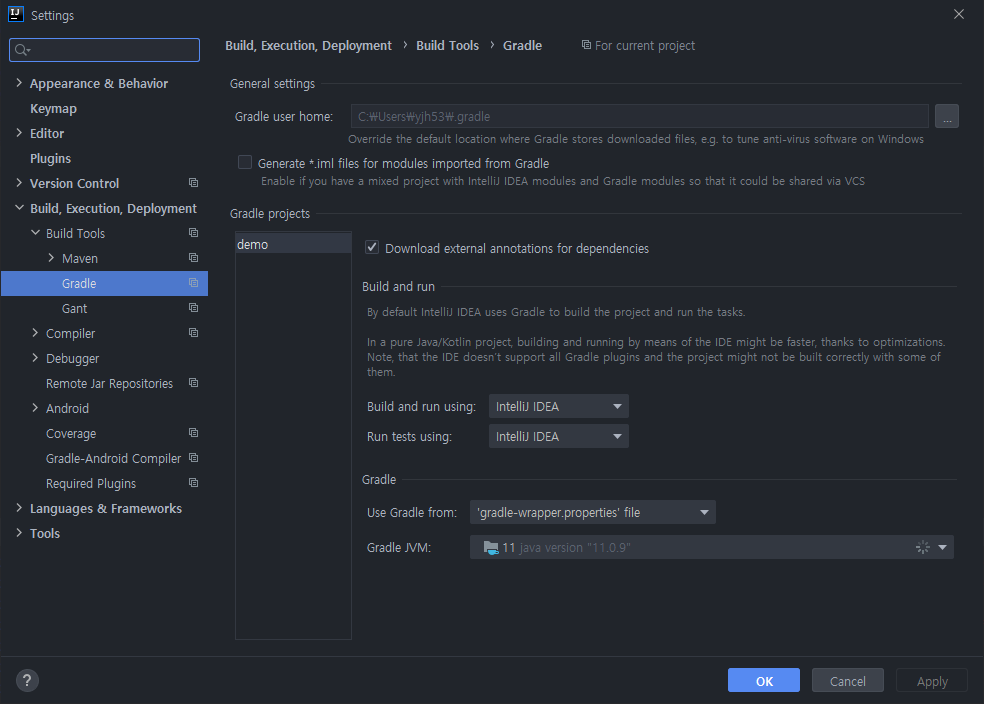
- [File > Settings] 메뉴 클릭(단축키: ctrl + alt + s)
- [Build, Execution, Deployment > Build Tools > Gradle] 메뉴로 이동
- Build and run using을 IntelliJ IDEA로 변경
- Run tests using을 IntelliJ IDEA로 변경
- Gradle JVM을 jdk11로 변경(없다면 설치)
^^7
728x90
반응형
'오류기록' 카테고리의 다른 글
| [java] error: cannot find symbol method (0) | 2023.07.31 |
|---|---|
| [ERROR] 'npm start' returns error: "There might be a problem with the project dependency tree" (0) | 2023.07.04 |
| Android Studio SDK 설치하기 (2) | 2023.04.13 |
| Visual Studio 2022 (2) | 2023.04.06 |
| [오류] JNI 써먹을때 UnsatisfiedLinkError Can't find dependent libraries (feat.Dependency walker) (4) | 2023.04.05 |
'오류기록' Related Articles
more


